
ByeDPI v1.2.0 APK — WITHOUT SPEED LIMITS TO ALL PROHIBITED SITES ACCESS
dovecoteescapeeUpdated
10 November, 2024Size
5.7MBVersion
1.2.0Requirements
5.0 and laterGet it on

Images


Description
ByeDPI Android Application: Safe and Unblocked Internet Experience
ByeDPI Android application is a powerful internet censorship bypass tool designed to offer its users a free internet experience. In today's digital world, censorship and access barriers on the internet are increasing and this creates serious restrictions on access to information. ByeDPI provides an effective solution for users who want to overcome such limitations. It is specifically designed to counter the technology called deep packet inspection (DPI), which blocks access to certain sites by analyzing the content of data packets. ByeDPI allows users to access the sites they want without any problems by bypassing DPI blocks.
ByeDPI's Highlights:
- Easy to Use: ByeDPI can be easily downloaded and run quickly without the need for complex settings.
- Free Access: ByeDPI, It offers uninterrupted access to social media platforms, news sites or other censored content by overcoming DPI blocks.
- High Security: Protects users' data and ensures internet freedom safely.
- High Speed: When DPI blocks are removed, internet speed also increases; With ByeDPI, you can access the internet quickly without any delays.
Accessibility Advantages with ByeDPI Android:
- Access to Censored Sites: You can easily access blocked content, news sites, social media platforms and other resources around the world.
- Data Privacy Protection: ByeDPI keeps your personal data and internet activities safe. It protects your online privacy and minimizes the risk of being tracked.
- Access from Anywhere: Since it works on mobile devices, you can navigate freely anywhere by overcoming censorship with ByeDPI, even on the go.
How Does ByeDPI Work on Android?
ByeDPI neutralizes DPI technology by hiding the data packets sent over your internet connection. brings. It offers a freer internet to its users, especially by disabling restrictions imposed by internet service providers (ISPs). This makes ByeDPI a unique tool that allows users to have an uncensored and fast internet experience.
ByeDPI Android application redefines freedom in internet access with its user-friendly interface and powerful features.
Frequently Asked Questions
I cannot configure the application. What should I do?
You can ask for support in the discussion section to get help.
Does the application require root access?
No. All app features work without root access.
Is this a VPN?
No. The app uses VPN mode to route traffic on Android, but does not send any data to a remote server. It does not encrypt traffic and does not hide your IP address.
How do I use ByeDPI with AdGuard?
Run ByeDPI in proxy mode.
Add ByeDPI to exceptions in the “Application management” tab in AdGuard.
Adjust the following proxy settings in AdGuard settings do:
- Proxy type: SOCKS5
- Proxy host: 127.0.0.1
- Proxy port: 1080 (default)
What data does the app collect?
It does not collect any data. The application does not send any data to a remote server. All traffic is processed on the device.
Are there any for other platforms?
There are similar projects.
What is DPI?
DPI (Deep Packet Inspection) is a technology used to analyze and filter traffic. Used by providers and government agencies to block sites and services.
ByeDPI v1.2.0 APK — ACCESS ALL PROHIBITED SITES WITHOUT SPEED LIMITS MOD INFORMATION
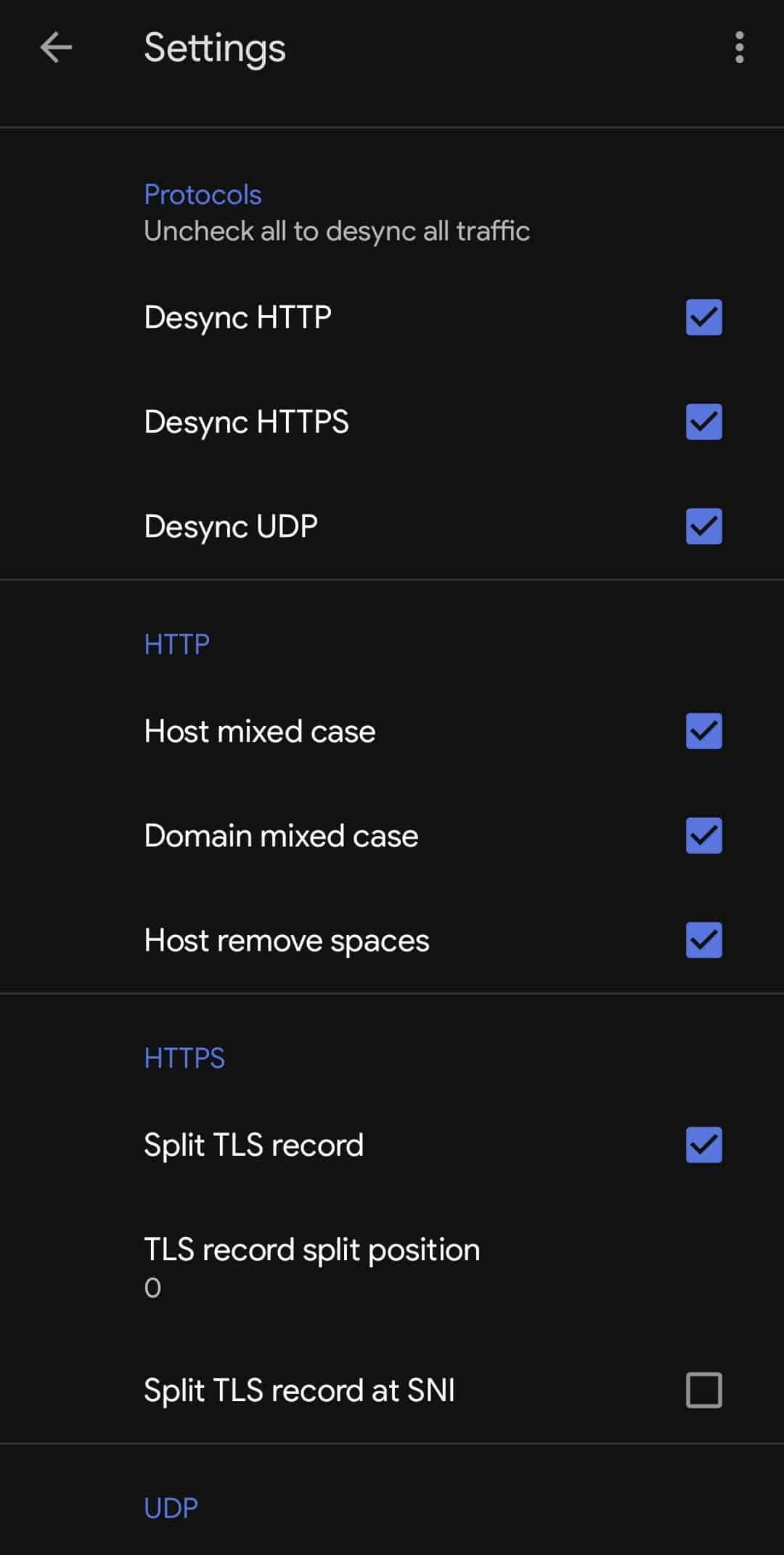
SETUP (DISCORD, SETTING TO ACCESS ALL PROHIBITED SITES)
- After opening the app "Enter settings from the top right".
- "UI editor" Turn on the setting.
- Make your settings as in the photo below.
Related apps





Blog Posts
-
 Resident Evil Survival Unit Mobile Game Reached 2 Million Downloads – Developers Celebrate Success 3 December 2025
 -
Helldivers Movie: Exciting Adaptation Project from Fast and Furious Director Justin Lin 3 December 2025
-
Splinter Cell Remake Former Director David Grivel Returned to the Project 3 December 2025
-
CD Projekt Aims to Complete the New Witcher Trilogy in 6 Years 3 December 2025
-
GTA 6 Animation Leaks Come from Rockstar Employee: Bicycle and Lucia Scenes Go Viral 2 December 2025
-


